MassCANS Training – FAQ Guide
USERNAMES / PASSWORDS / LOGINS
I forgot my username and/or password.
Below are the steps to recover your CANS Training username or reset your password.
Please note we cannot view passwords.
If you forgot your username:
• Select “Forgot Username” on the login page.
• Enter your email address and last name.
• Click Submit.
• Answer the security question when prompted.
Your username will be emailed to the address currently listed in your MassCANS Training
record.
If you forgot your password:
• Select “Forgot Password” on the login page.
• Enter your username and click Submit.
• Answer the security question.
• Create and confirm your new password, then click Submit.
If you cannot answer the security question, select “Reset Password.”
You will receive an email with instructions to create a new password and will then be returned to
the MassCANS Training homepage.
I cannot answer the security question associated with my
login.
Select the “Reset Password” option.
You will receive an email with instructions to create a new password and will then return to the
MassCANS Training homepage.
I no longer work for the agency listed on my account. How do I update my information?
If you need to update your agency affiliation, please use the “Edit Profile” button in your account.
For other changes, use the “Edit Profile” button in your account.
Should I create a new account if I forget my login information
or change agencies?
No. Previously certified clinicians should not create a new CANS Training account. Multiple accounts create multiple certification keys, which can cause issues in the Virtual Gateway.
Each user should have:
• One CANS Training account
• One certification key attached to their name, not their agency
If you are having trouble with your certification key, try entering it into the Virtual Gateway again, it often works on the second attempt.For password help, see the “password reset” information above.
I work for two agencies. Do I need two CANS accounts?
No. Even if you work for multiple agencies, you should maintain one CANS Training account
and one certification key.
Your certification key is tied to your name, not your employer.
ACCESSING ACCOUNT
I have not received my Virtual Gateway login.
The CANS Help Desk manages training and certification only. We cannot assist with Virtual Gateway login issues. For support, contact Virtual Gateway Customer Service:
Phone: 1-800-421-0938 (recommended)
Email: virtualgatewayCBHI@state.ma.us
I was certified long ago and want to recertify, but I don’t
remember my login, email, or username.
Please contact the Help Desk (MassCANS@umassmed.edu) for assistance. We can reconnect you to your original account.
I cannot find my certification key.
To view your certification key:
1. Log in at https://masscans.ehs.state.ma.us.
2. On the homepage, select “My Account” in the left sidebar.
3. Select “My Certification.”
Your certification key will appear on the next screen. You can print or save it as a PDF for your
records.
CREATING MY ACCOUNT
What should I enter under “Organization” if I am not currently a practicing clinician?
Accounts are tied to your name, not an agency. If you are not yet practicing:
• Enter the highest degree you have earned.
• Enter the age range of youth you expect to work with.
Other fields can be updated later as your role changes.
I entered incorrect information when creating my account.
Please contact the Help Desk (MassCANS@umassmed.edu) and we can update your
information.
I accidentally created two accounts because I forgot my old login.
Please contact us (MassCANS@umassmed.edu) so we can archive the duplicate account. Multiple accountscreate multiple certification keys and may cause issues in the Virtual Gateway. Each user should have one account and one certification key.
I am located out of state but work for an agency serving
youth in Massachusetts. How do I get certified?
Clinicians and students who provide services to Massachusetts youth receiving MassHealth are eligible for CANS certification, even if they live out of state. Out-of-state accounts must be approved by our team (MassCANS@umassmed.edu) before training can begin.Certification keys are valid only in the MassHealth CANS portal. Create your CANS Training account and notify us once it is set up so we can approve it
VIRTUAL GATEWAY
I am having trouble accessing the Virtual Gateway to enter client information. I have my certification key.
We do not have access to the Virtual Gateway. For assistance, contact Virtual Gateway Customer Service:
Phone: 1-800-421-0938 (recommended)
Email: virtualgatewayCBHI@state.ma.us
Let them know your certification key has been verified.
My name has changed. How do I update it in the Virtual Gateway?
Contact your organization’s VG Access Administrator. They will submit a User Request Form (URF) to deactivate your old name and activate your new one. Allow 7–10 business days for processing.
If you are in private practice or do not have an Access Administrator, contact the Virtual Gateway directly at 1-800-421-0938. Your username will remain the same. To confirm your information has been updated, contact your Access Administrator or Virtual Gateway Customer Service.
CANS CERTIFICATION EXAM
I failed my exam. What should I do?
If you fail the certification test three times, contact the Help Desk. We will reset your account, giving you three additional attempts.
Before retesting:
• Complete the full training.
• Consider reviewing the CANS User Guide during the exam.
• If you need additional support, a CANS Consultant is available upon request (MassCANS@umassmed.edu).
I think my certification exam is in the wrong patient setting (IHT or OP)
There is no wrong patient setting for the certification exam. The certification exam may present cases in either IHT or OP settings. This is due to the number of cases available. To support your learning, a new case will appear each time you take the exam.
- This variation should not impact your ability to complete the exam and will not be reflected on your certification.
- It is recommended that you watch the video each time you take the exam.
- I want to review the certification exam instructions
Certification Exam Instructions:
Congratulations on successfully completing the Massachusetts CANS Training!
You are now eligible to take the certification exam. Please note: The certification exam may present either IHT or OP settings. This is due to the number of cases available. To support your learning, a new case will appear each time you take the exam. This variation should not impact your ability to complete the exam and will not be reflected on your certification.
Certification Requirement: A score of 70% or higher is required to earn CANS certification or re-certification.
Completion Timeline: You may save your progress and return within 30 days. After 30 days, you must start a new exam.
Exam Structure: You will be randomly assigned an approximately 45-minute film-based case vignette that will show a client and their family completing a clinical intake.
- It is recommended that you watch the video each time you take the exam.
- The case can be paused at any time, and your progress will be saved. Your overall progress will also be automatically saved as you complete the CANS.
- Complete the CANS assessment from the perspective of the clinician assessing the client and their family.
You may use resources or notes while you complete the exam, and we encourage you to review and use the User Guide. You may not have assistance from another person while completing the exam. When you are ready, click Resume Certification Exam to resume. If you have technical difficulties, contact the helpdesk at: MassCans@umassmed.edu or 774-455-4057.
- How do I get CEs for the CANS certification training?
To obtain Continuing Education credits following completion of the training, you must first pass the CANS Certification Exam and then complete the online evaluation survey after the exam. You will be asked if you would like to apply for CEs, and will subsequently be asked to provide your license type and number. Please note that you will have up to 90 days to apply for credits. You may obtain Continuing Education credits one time per licensure period. To obtain Continuing Education credits you must visit the Berkshire Area Health Education Center (AHEC) site (*linked below) and pay the associated fee, stated below for each license type.
If you have questions about the CE process, please contact Berkshire AHEC directly at 413-842-5160.
*For CE purposes, there are two “versions” of the CANS Training: one with a Supervisor Module (for Supervisors) and one without. Apart from the Supervisor Module, the trainings are identical. Review the sections below to see which applies to you. Applying for CE credit for the wrong version may delay your certificate.
Non-Supervisor Training
If you wish to apply for CEs and did not complete the Supervisor Module in the CANS Training, apply through Berkshire AHEC here.
Social Work: This program has been approved for 4 Social Work Continuing Education hours for relicensure, in accordance with 258 CMR. NASW-MA Chapter CE Approving Program, Authorization Number D20373-2. The fee is $80.
Licensed Marriage and Family Therapists: This activity has been certified by the New England Association for Family and Systemic Therapy, Inc., for professional continuing education for 4 CE hours. Certification 215346782-B. The fee is $80.
Nursing: This program meets the requirements for 4 nursing contact hours as specified by the Massachusetts Board of Registration in Nursing - 244 CMR 5.04. The fee is $80.
Licensed Mental Health Counselors: Berkshire AHEC, ACEP No. 5585, and University of Massachusetts Medical School, ACEP No. 6842, are co-sponsors of this program. This cosponsorship has been approved by NBCC Both ACEPs are responsible for this program, including the awarding of NBCC credit. 4 CE Hours. The fee is $80.
Licensed Alcohol and Drug Counselors: This course has been approved by the Department of Public Health, Bureau of Substance Abuse Services/LADC Unit for 4 contact hours for Licensed Alcohol and Drug Counselors and Assistants. The fee is $80.
Psychologists: Application for Psychology continuing education credits has been submitted. Please contact Berkshire AHEC at 413-842-5160 for the status of Psychology CE accreditation. The fee is $115.
Supervisor Training
If you wish to apply for CEs and did complete the Supervisor Module in the CANS Training, apply through Berkshire AHEC here.
Social Work: This program has been approved for 4.5 Social Work Continuing Education hours for relicensure, in accordance with 258 CMR. NASW-MA Chapter CE Approving Program, Authorization Number D20373-1. The fee is $80.
Licensed Marriage and Family Therapists: This activity has been certified by the New England Association for Family and Systemic Therapy, Inc., for professional continuing education for 4.5 CE hours. Certification 215346782-A. The fee is $80.
Nursing: This program meets the requirements for 4.5 nursing contact hours as specified by the Massachusetts Board of Registration in Nursing - 244 CMR 5.04. The fee is $80.
Licensed Mental Health Counselors: Berkshire AHEC, ACEP No. 5585, and University of Massachusetts Medical School, ACEP No. 6842, are co-sponsors of this program. This cosponsorship has been approved by NBCC Both ACEPs are responsible for this program, including the awarding of NBCC credit. 4.5 CE Hours. The fee is $80.
Licensed Alcohol and Drug Counselors: This course has been approved by the Department of Public Health, Bureau of Substance Abuse Services/LADC Unit for 4.5 contact hours for Licensed Alcohol and Drug Counselors and Assistants. The fee is $80.
Psychologists: Application for Psychology continuing education credits has been submitted. Please contact Berkshire AHEC at 413-842-5160 for the status of Psychology CE accreditation. The fee is $115.
NEW CANS
Who can answer questions about the content of the new
CANS assessment?
Questions about the new assessment should be directed to CBHI. Contact Virtual Gateway Customer Service at 800-421-0938 and request to be transferred to CBHI. You may also email CANS-CBHI@state.ma.us.
How do I set up CANS in the new e-CAS system?
The new e-CAS system will replace the current platform used to complete the CANS assessment. Setting up CANS in e-CAS depends on whether your agency uses an internal EHR system or relies on the Virtual Gateway:
• If your agency uses its own EHR:
Your technical team must review the e-CAS Technical Specifications and ensure your EHR is configured to integrate with e-CAS. This may involve updating data pathways, adjusting workflows, or completing new interface development. All technical questions should be directed to EHS-MA-ECAS-IT@mass.gov.
• If your agency does not use an internal EHR: You will continue accessing CANS through the Virtual Gateway until further instructions are released. MassHealth will provide additional guidance as the e-CAS rollout approaches.
Will there be a paper version of the CANS?
At this time there is no plan to publish a paper version of the CANS. If, in the rare occasion, a family requests a paper CANS the SED only is required to be put into the application.
I need help with the eCAS Wellsky Training.
For any questions or issues related to eCAS training, please reach out directly to the Training Services team at WellSky through the “Contact Us” page on their site. This includes requests for new user accounts that need to be added. If you encounter issues with your username or password, you can use the self-service option on the WellSky login page by selecting “Forgot password?” to reset your credentials.
How is consent being addressed now?
MassHealth is no longer requiring any consent forms. Providers can decide if they will continue to require consent. However, please note that the SED will still be input into the system regardless of consent. Parental consent is not technically required to input any data in eCAS. However, in the rare occasion that a family has a strong reason for not inputting the data, the SED determination still needs to be input. A CANS assessment is part of the service and cannot be declined in its entirety. If a family doesn’t want a CANS completed, the clinician must speak about whether the service is appropriate for the family.
CANS TRAINING & PRACTICE TEST
I accidentally clicked the wrong setting at the beginning of the training.
That question is simply used to determine the type of case you will see during your training. The rest of the CANS training is the same for all clinicians, regardless of the setting in which they work. You can continue with the training as normal; there's no need to make any changes.
I am having issues submitting my practice exam.
This usually happens for one of a few reasons, so please try the steps below:
- Make sure you are using a computer. The system will not allow submissions from a mobile device.
- Confirm that every question is completed; the test will not submit if anything is left blank.
If you feel everything is completed and it's still not allowing you to submit, please try the following:
- Log out completely, close the browser, then reopen it and log back in.
- Clear your browser history/cache, then try again.
- If you attempt to submit multiple times without logging out, the session may be stuck. Logging out and back in normally fixes this.
- Try a different browser if possible (Chrome, Firefox, Edge).
Once you’ve done these steps, the test should allow you to submit.
Is the practice test optional?
Yes, the practice test is optional. However, if you start a practice test you must submit it to be able to move on to the certification exam. We recommend saving each section as you go.
How do I move on from the practice test to the certification exam?
You must make sure your practice test has been saved and submitted.
- Then return to the homepage
- Click Resume Training
- Click Next after training modules with the green checks.
- On the next page, click on I feel ready to take the Certification Test.
I think my practice test is in the wrong patient setting (IHT or OP)
There are two versions of the practice test (Jayden IHT and Jayden OP). The type of case example you selected before you began the training (Outpatient or In-Home Therapy) will determine if you see the Jayden OP or Jayden IHT case video.
I want to review the practice test instructions.
Practice Test Instructions:
Congratulations on successfully completing the Massachusetts CANS Training! You are now eligible to take the Practice Test.
Please note: There are two versions of the practice test (Jayden IHT and Jayden OP). The type of case example you selected before you began the training (Outpatient or In-Home Therapy) will determine if you see the Jayden OP or Jayden IHT case video.
Scoring: A score of 70% or higher is required to pass the practice test.
Completion Timeline: You may save your progress and return within 30 days. After 30 days, you must start a new test.
Test Structure: You will be assigned either the Jayden Outpatient Therapy or Jayden In-Home Therapy case video, depending on which option you selected before you began the CANS training. The case video is approximately 45-minutes long and shows Jayden and his family completing a clinical intake.
- Click the “Video” tab to watch the case video. It is recommended that you watch the video each time you take the practice test.
- The video can be paused so you can toggle between the "Video" and "Questions" tabs.
- The Referral Form provides additional information about Jayden and his family.
- Complete the CANS assessment from the perspective of the clinician assessing the client and their family, using only the information presented in the video and Referral Form.
You may use resources or notes while you complete the test, and we encourage you to review and use the User Guide.
You may not have assistance from another person while completing the test. You can continue reviewing the material. When you are ready, click Resume Practice Test to resume.
If you have technical difficulties, contact the helpdesk at: MassCans@umassmed.edu or 774-455-4057.
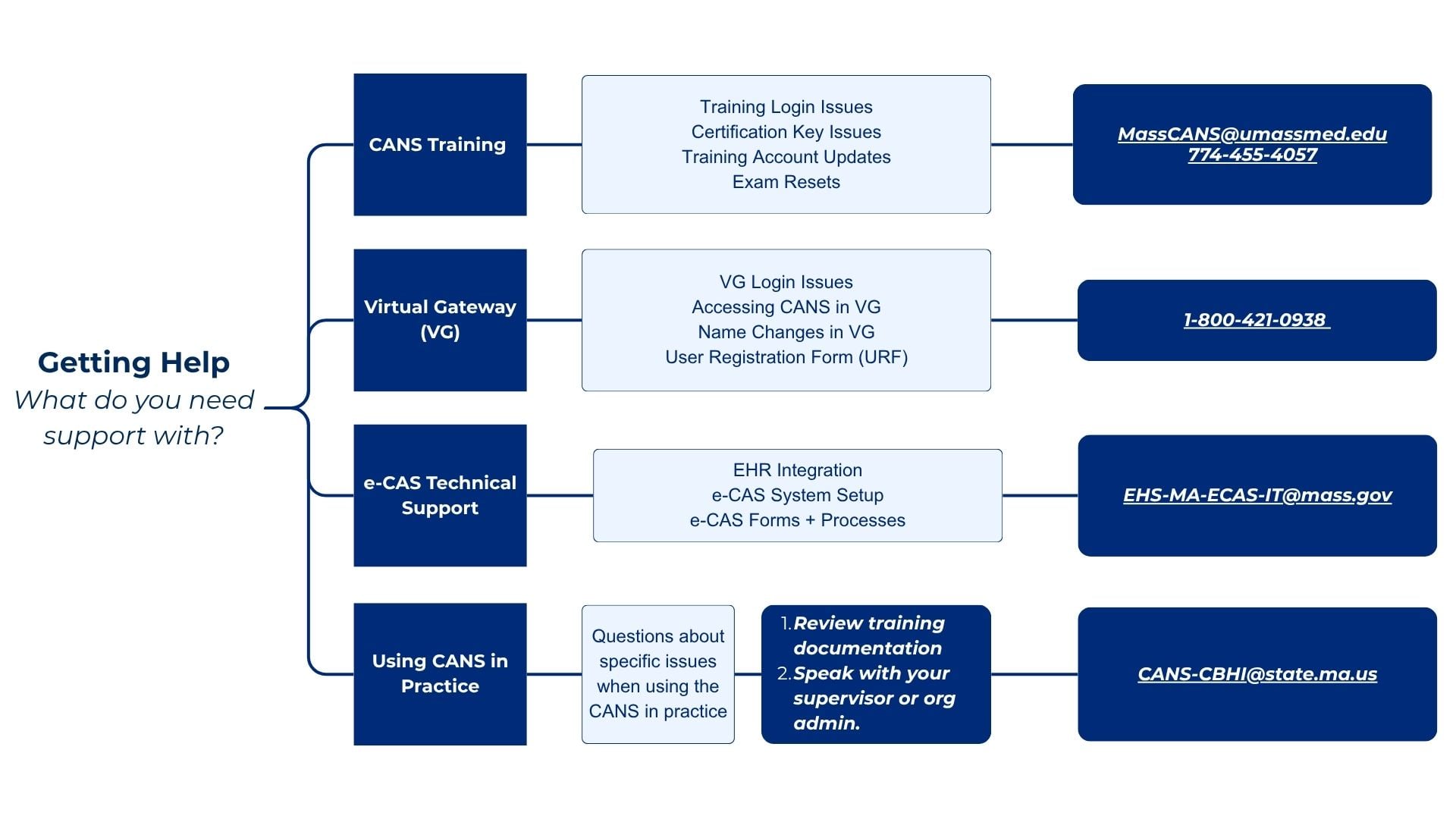
Not sure who to contact? Review the help desk flowchart.